
Auto Recorder PRO1.3.8 - Google Play
You'll be able to see results in few seconds.
Publisher Description
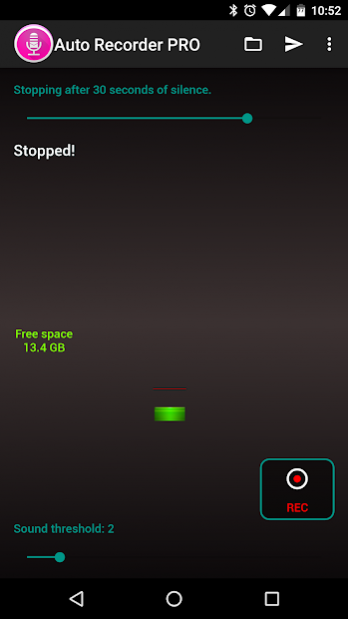
Auto Recorder, starts and stops the record function when sound of a sufficient level is picked up by the microphone. This feature saves valuable recording time by not recording periods when there is little or no sound.
- No ADS.
- "Auto upload" to Dropbox option.
- Can record when the application starts.
- Can record when the device turns on.
PRO:
- Android Wear support
- Smart Voice-activated Spy recording.
- Mic calibration recorder.
- Stopping recording automatically.
- Live audio spectrum analyzer.
- Unlimited recording time.
- Date-based naming.
- Background recording (You can open other app while recording, even when display is off).
- Built-in share memo (Bluetooth, Drive, Dropbox, Email, Gmail, WhatsApp, etc.).
- Audio files .wav (3GP, AMR, MP4) export over the USB.
- Supports any OS (Linux, Mac OS, Windows, etc.) to playback using VLC.
- Landscape and portrait display modes support for Tablet.
- Show free space.
- Can use the rear microphone.
- Can increase microphone volume.
- Can delete older records if you are running out of storage space.
- Can set the sampling frequency (kHz).
- Handle recording by text message.
For control via SMS must first activate the setting, you can use the following SMS:
Auto Recorder Pro REC
Auto Recorder Pro STOP
Auto Recorder Pro threshold 5
The threshold has values between 1 and 10.
In telecommunications, a voice operated switch, also known as VOX or Voice Operated eXchange, is a switch that operates when sound over a certain threshold is detected. It is usually used to turn on a transmitter or recorder when someone speaks and turn it off when they stop speaking. It is used instead of a push-to-talk button on transmitters or to save storage space on recording devices. On cell phones, it is used to save battery life. Intercom systems that use a speaker in a room as both a speaker and a microphone will often use VOX on the main console to switch the audio direction during a conversation. The circuit usually includes a delay between the sound stopping and switching direction, to avoid the circuit turning off during short pauses in speech (From Wikipedia).
About Auto Recorder PRO
The company that develops Auto Recorder PRO is Giuseppe Romano. The latest version released by its developer is 1.3.8.
To install Auto Recorder PRO on your Android device, just click the green Continue To App button above to start the installation process. The app is listed on our website since 2019-05-03 and was downloaded 0 times. We have already checked if the download link is safe, however for your own protection we recommend that you scan the downloaded app with your antivirus. Your antivirus may detect the Auto Recorder PRO as malware as malware if the download link to com.aiuspaktyn.spyrecorderpro is broken.
How to install Auto Recorder PRO on your Android device:
- Click on the Continue To App button on our website. This will redirect you to Google Play.
- Once the Auto Recorder PRO is shown in the Google Play listing of your Android device, you can start its download and installation. Tap on the Install button located below the search bar and to the right of the app icon.
- A pop-up window with the permissions required by Auto Recorder PRO will be shown. Click on Accept to continue the process.
- Auto Recorder PRO will be downloaded onto your device, displaying a progress. Once the download completes, the installation will start and you'll get a notification after the installation is finished.
Program Details
System requirements
Download information
Pricing
Version History
version 1.3.8
posted on 2019-05-03
. SMS feature removed (Project Strobe)
. Android Pie
. Can hide from recent apps list
. Can delete all files
. Chromebook
. Handle recording by text message
. Android Wear support
. Samsung Multi Window
. LG Split Window
. Dropbox API v2
version 1.3.8
posted on 2019-05-03
Disclaimer
Official Google Play Link
We do not host Auto Recorder PRO on our servers. We did not scan it for viruses, adware, spyware or other type of malware. This app is hosted by Google and passed their terms and conditions to be listed there. We recommend caution when installing it.
The Google Play link for Auto Recorder PRO is provided to you by apps112.com without any warranties, representations or guarantees of any kind, so access it at your own risk.
If you have questions regarding this particular app contact the publisher directly. For questions about the functionalities of apps112.com contact us.
